







Thanksgiving Themes for Your Social Wall Are Now Live
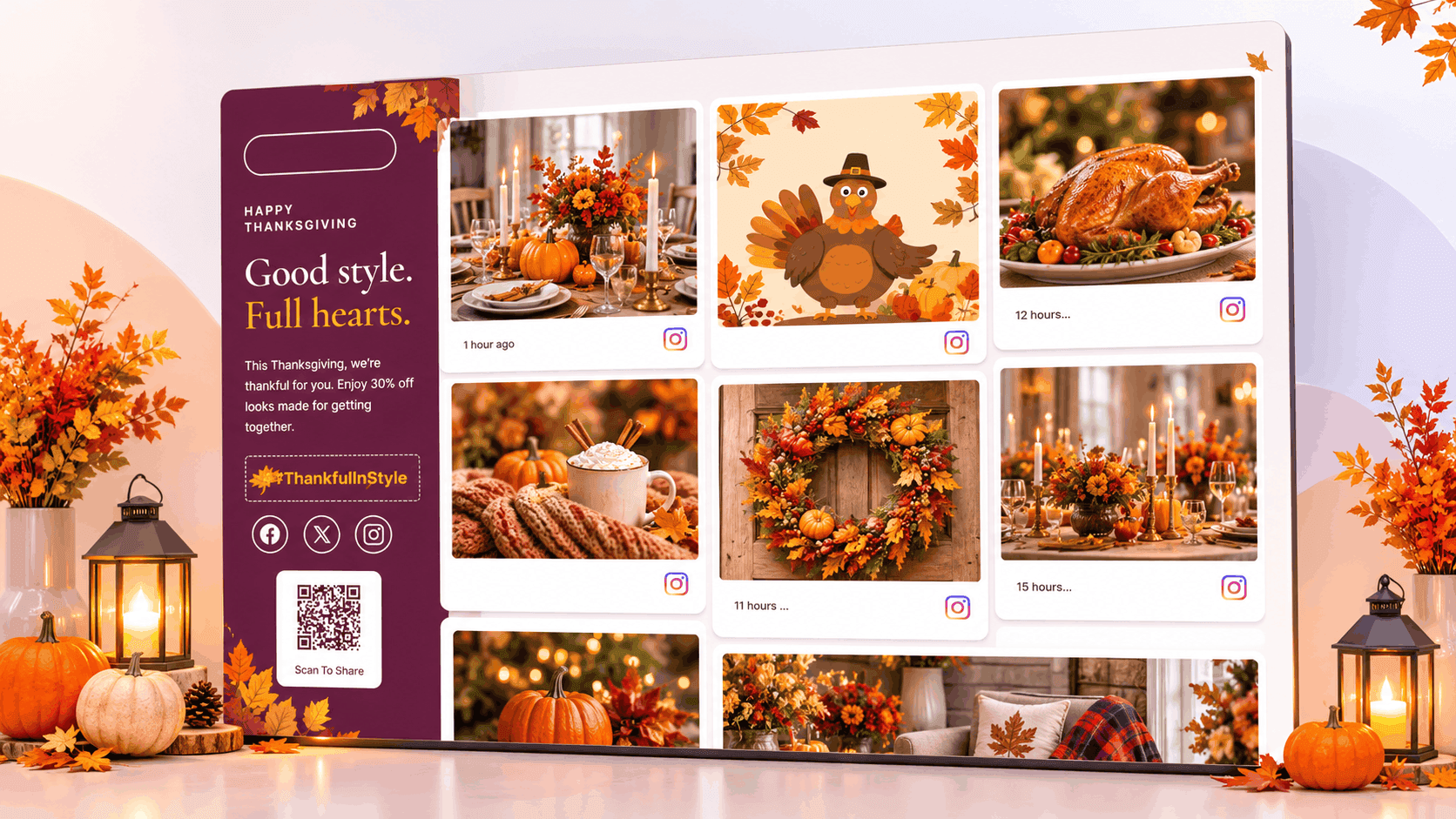
Thanksgiving themes for your social wall are now live on Social Walls by Taggbox. Each theme is a pre-made, full-wall layout that gives your entire display a festive look with Thanksgiving banners, ready-made headline text, autumn backgrounds, and floating seasonal icons.
From warm harvest decorations to messages of gratitude, these new designs help you bring the Thanksgiving spirit to your event and digital display screens without spending hours designing everything from scratch.
Let’s explore the new Thanksgiving themes and see how you can use them to make your social wall more engaging.
Why Decorating a Social Wall Manually Is a Hassle
If your event screens and digital displays still look static and non-interactive during Thanksgiving celebrations, it’s time to give them a festive makeover.
Creating a Thanksgiving wall usually means briefing a designer for a seasonal banner, finding autumn-inspired fonts that people can read across a room, selecting decorations like pumpkins and falling leaves, and arranging everything around your social media posts.
Then, all of it has to be tested on the live screen to see how it looks, which takes additional time.
So, if your social media wall still looks like any other day, people might simply pass by without realizing they can participate.
Social Walls Thanksgiving themes solve exactly this. Each theme comes with a ready-made festive design, so you don’t have to create everything manually. Just choose your preferred look, preview it, and get your Thanksgiving social wall ready.
Let’s explore what these themes offer.
What You’ll Find in Each Thanksgiving Theme
A well-designed Thanksgiving theme takes care of three things that usually take up your time: how your social wall looks, what it says, and how it brings your content together.
With Social Walls by Taggbox, you get ready-made festive themes with Thanksgiving-inspired backgrounds, seasonal decorations, and customizable banners. Here is what you can expect from these themes.
Full-Wall Thanksgiving Styling

Give your entire social wall a festive makeover with Thanksgiving-inspired backgrounds and decorations. From warm autumn colors and falling leaves to pumpkins and harvest illustrations, the designs bring the Thanksgiving spirit to your display.
The background, edges, and decorative elements work together to create a consistent look while keeping your social media posts easy to read.
Ready-Made Festive Banner Text

Every Thanksgiving theme comes with ready-made banner text and festive headlines to set the mood for your celebration.
Use messages around gratitude, togetherness, and Thanksgiving wishes to encourage people to share their moments. If you’d prefer your own message, you can customize the banner text through the Content setting.
Floating Icons and Falling Effects

Add some movement to your Thanksgiving social wall with seasonal floating icons and falling effects.
Elements like autumn leaves and other festive decorations make your display more noticeable and add a little seasonal charm. With the Falling Effect setting, you can control how much movement appears on your wall.
Brand Customization Controls

Make your Thanksgiving social wall match your brand or event. Add your logo and frame, choose which social icons appear, and adjust the banner’s position and height.
The theme gives your wall its festive look, while the customization settings let you add your own branding and make the display feel more personal.
Works on Screens & on Website

Preview your Thanksgiving theme in both Digital Display and Website views before saving. This helps you check how the design looks on a large event screen, social media digital display, lobby display, or website page.
Make the required adjustments, save your design, and get your Thanksgiving social wall ready.
Explore festive Thanksgiving banners, harvest-inspired designs, floating autumn leaves, and customization options for your displays.

 No Credit Card Required
How to Enable a Thanksgiving Theme
Getting your Thanksgiving social media wall ready is simple. Follow these three steps to apply your preferred festive design.
Step 1: Turn on the Banner

From the left menu, click Personalize, then navigate to Festive Banner and switch on “Enable Banner”.
Step 2: Pick Your Thanksgiving Theme

Click “Choose From Templates“, stay on the Festive tab, and select your preferred Thanksgiving theme.
You can choose between the Gather. Give. Glow. design and A Little Gratitude, A Lot of Joy! design.
Step 3: Review and Save

In the top-right corner of the preview, use the “Digital Display” and “Website” toggle to check how your theme appears in each view.
Make any adjustments you like, and then click “Save”.
That’s it! Your Thanksgiving social media wall is ready to display festive messages and audience posts.
Where a Thanksgiving Social Wall Works Best
A Thanksgiving-themed social wall can be used across different spaces to bring people together and encourage them to share their moments.
Here are some places where you can use it.
Storefront Windows & Lobby Displays
Give your storefront windows and lobby screens a Thanksgiving makeover. Display festive greetings, customer photos, and social media posts to create a welcoming atmosphere for visitors.
The seasonal design makes your digital displays more noticeable and gives people a reason to stop and engage.
Restaurants and Cafés
Place your social media wall near the counter, dining area, or entrance. Guests can see other customers’ Thanksgiving experiences, share pictures of their festive meals, and become part of your social wall.
Want more ways to attract diners this Thanksgiving? Explore our Thanksgiving marketing ideas to promote seasonal menus, encourage customer participation, and create memorable dining experiences.
Thanksgiving Events and Parties
Put your live social wall on the big screen and let guests fill it with Thanksgiving moments in real time.
Display group photos, celebration highlights, and messages of gratitude to make everyone feel included.
Looking for more ways to make your celebration special? Explore our Thanksgiving event ideas for creative activities and ways to engage your guests.
Hotels and Hospitality Venues
Give hotel lobbies, banquet halls, and hospitality displays a festive Thanksgiving look.
Showcase guest experiences, seasonal greetings, and photos from Thanksgiving celebrations to create a warm and welcoming atmosphere.
Shopping Malls and Retail Stores
Run a Thanksgiving hashtag campaign and display shoppers’ posts on in-store screens.
Encourage visitors to share their shopping experiences and participate in seasonal campaigns. This also helps build social proof through customer-generated content.
Corporate Offices and Employee Engagement
Thanksgiving is a great time to appreciate employees and celebrate team connections.
Host a workplace gratitude campaign and invite employees to share what they’re thankful for. Display their messages, team pictures, and appreciation posts on office screens to bring colleagues together.
Planning a Thanksgiving celebration at work? Explore our Thanksgiving employee appreciation ideas for creative ways to appreciate employees and make your office celebrations more memorable.
Your Website
Switch the preview to Website and display the same Thanksgiving social feed on a campaign landing page or seasonal page.
Showcase customer experiences, Thanksgiving wishes, and social media posts to keep online visitors engaged.
In each of these scenarios, display the Scan To Share QR code on the wall so people can upload their Thanksgiving photos and messages right away.
Choose your favorite Thanksgiving template, preview it on your screen, and save your festive social wall in just a few clicks.
No Credit Card RequiredHow to Get More Out of a Thanksgiving Theme

The theme establishes the look. These simple ideas can help you encourage more people to participate and share their Thanksgiving moments.
- Choose one Thanksgiving hashtag. Include it in your banner so guests and employees can easily remember it when sharing their posts. You can use a hashtag like #ThankfulInStyle, featured in the Gather. Give. Glow. theme.
- Place the QR code where people tend to stop. Entrances, dining tables, queues, and gathering areas work well because people can scan while they wait. Our guide to QR codes for photo sharing explains how to collect photos and videos through QR codes.
- Enable moderation before your celebration begins. Under Moderation, you can approve posts manually or turn on Auto Pilot to help keep inappropriate content off your display.
- Ask people what they’re thankful for. Use a simple question like “What Are You Thankful For?” to encourage guests and employees to share their messages and experiences.
- Combine the wall with a photo booth. Let guests capture Thanksgiving pictures and display their moments on the social wall. This gives everyone another fun way to participate.
- Check the screen from where people will be standing. The preview is a good starting point, but view the actual display from a few metres back to make sure your text and posts are easy to read.
Final Thoughts
Thanksgiving is all about gratitude, togetherness, and sharing special moments. Your social wall should reflect that spirit without taking days to design.
With the new Thanksgiving themes from Social Walls by Taggbox, there’s no need to brief a designer, create banners from scratch, or spend hours arranging festive decorations.
Give your social wall a festive makeover and make this Thanksgiving more engaging with Social Walls by Taggbox.
Frequently Asked Questions
No. Thanksgiving themes are pre-made, full-wall layouts. Simply choose your preferred template from the Festive tab and apply it to your social wall.
Yes. You can use the available customization settings to add your logo and frame, choose social icons, and adjust the banner’s position and height. You can also change the banner content through the Content setting.
You can return to the Personalize section and change or disable the Festive Banner. You can then choose another available theme or return to your preferred regular wall design.
Yes. You can use the Falling Effect setting to control how much movement appears on your social wall.
Social Walls by Taggbox offers moderation options to help you manage the content displayed on your wall. You can manually approve posts or use Auto Pilot to filter content before it appears on your screens.
Yes. The Thanksgiving themes include a Scan To Share QR code that visitors can scan to share their photos and moments on your social wall.