 Events
  Digital Signage
  Hybrid Events
  Instagram Wall
 Twitter Wall
  TikTok Wall
 Hashtag Campaign
 Social Media Aggregator
 Linkedin Wall
 Facebook Wall
 Studio
 SnapUp
 Spotlight
 Analytics
 Moderation
 Customization
 Reactions
 Photobooth
 Education
 Fitness
 Hospitality
 Healthcare
 Retail
 Agencies
 Sports
 Finance
 Non-profit
 News & Entertainment
 Ecommerce
 Blog
Blog Support
 Our Clients
 Integration
 Case Studies
 Get Inspired


Many websites begin to feel dull or disconnected over time, and visitors can sense it quickly. Brands often overlook how much impact real social interactions can make. When they choose to embed Facebook feed, they add live conversations, reviews, and reactions straight from their audience to their website—without relying on staged content.
In a digital space where people trust visible engagement more than polished marketing copy, a live Facebook feed helps a website look active, genuine, and socially aware. It shows real comments, likes, and shares, which can naturally build credibility and give visitors a glimpse of authentic brand activity.
Benefits of Adding a Facebook Widget to a Website
Boost Social Proof Automatically
When you embed Facebook feed on website, visitors don’t just see pretty visuals—they see actual reactions and feedback. It’s like putting honest customer sentiment right on your homepage, and that builds trust way faster than a testimonial that sounds scripted.
Keep Your Website Fresh & Updated
A facebook widget on website updates whenever you post. No saving images, no copy-pasting captions. I’ve personally saved hours because the feed keeps itself fresh, and that makes a difference when you’re managing multiple pages.
Increase Engagement & Time Spent on Page
People are curious by nature—reviews, photos, albums, they invite scrolling. When you embed facebook feed, visitors stick around longer, skim comments, and get a sense of community, which usually means lower bounce rates.
Strengthen Brand Presence & Storytelling
Embedded posts reveal moments your audience cares about—events, behind-the-scenes shots, team wins, customer love. It gives your site personality instead of feeling like a static brochure.
Drive Conversions & Grow Followers
When you embed facebook feed to website, you’re not just displaying content; you’re opening a door. Visitors can follow you, interact, and convert with less friction—because they already saw genuine proof of activity.
How to Embed a Facebook Feed on a Website
Below is a simple, beginner-friendly walkthrough on how to embed facebook feed on website using Social Walls.
Step 1: Sign Up or Log In to Social Walls

Go to Social Walls and either log in or sign up if you don’t have an account yet.
Inside the dashboard, you can build and customize your Facebook feed to match your branding. If you’re planning multiple feeds or campaigns, managing everything in one place helps you stay organized.
Step 2: Click on “My Walls” and Create a Wall
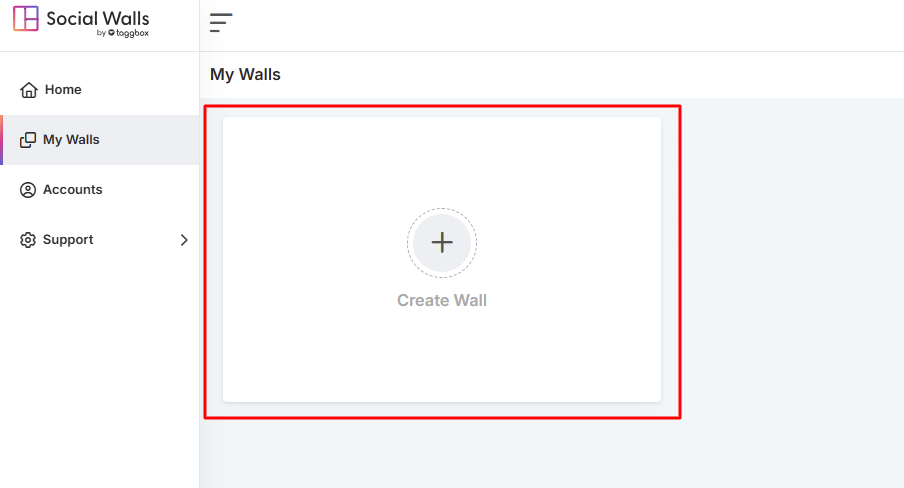
Step 3: Name Your Display Wall Based on Themes
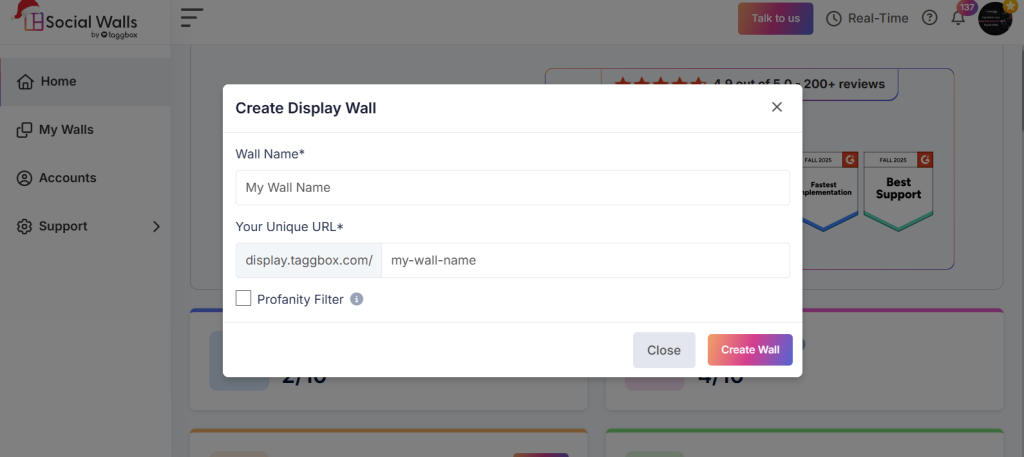
Give your feed a name that reflects its purpose. For example:
- Customer Reviews Wall
- Community Engagement Feed
- Event Highlights
- Product Launch Wall
- Local Business Updates
This makes it easier to edit and track feeds later when you embed facebook feed on different pages.
Step 4: Select Facebook as Your Source of Content
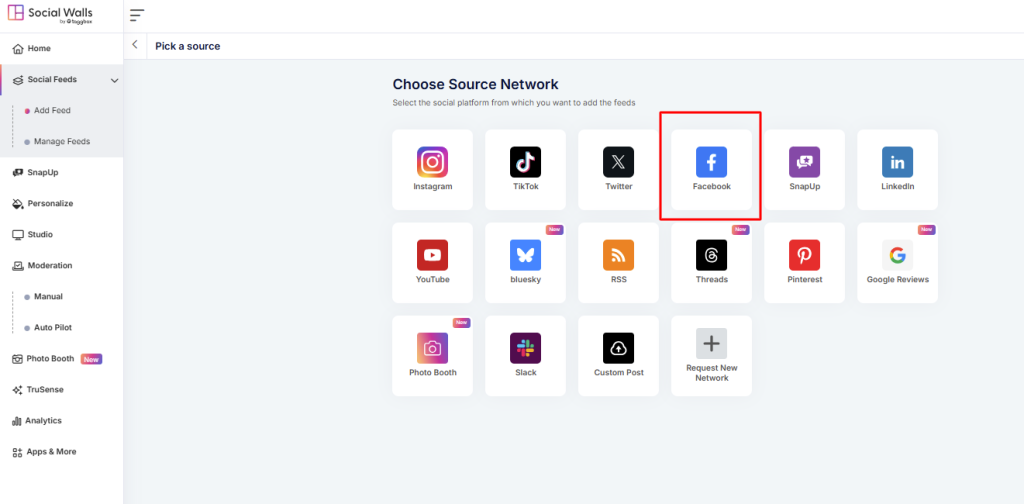
Choose Facebook as your platform.
This step connects your Facebook page or profile to Social Walls and ensures your feed can display posts, reviews, albums, mentions, or hashtags correctly.
Step 4: Choose Facebook feeds (Posts, Reviews, Albums, Mentions)
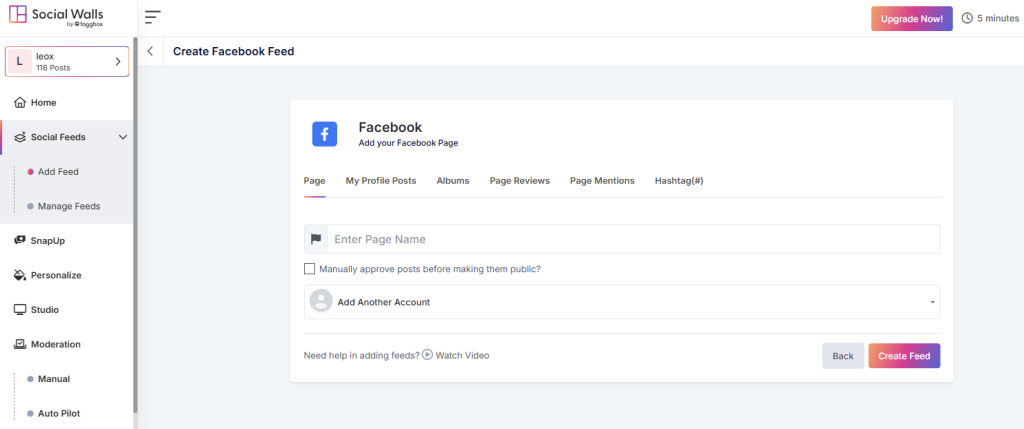
You can select from options such as:
- Page posts
- My profile posts
- Albums
- Page reviews
- Page mentions
- Hashtags
This gives you control over the type of content you display.
This selection ensures your embed facebook feed on website feels meaningful instead of random.
Step 5: Personalize and Preview your Social Wall
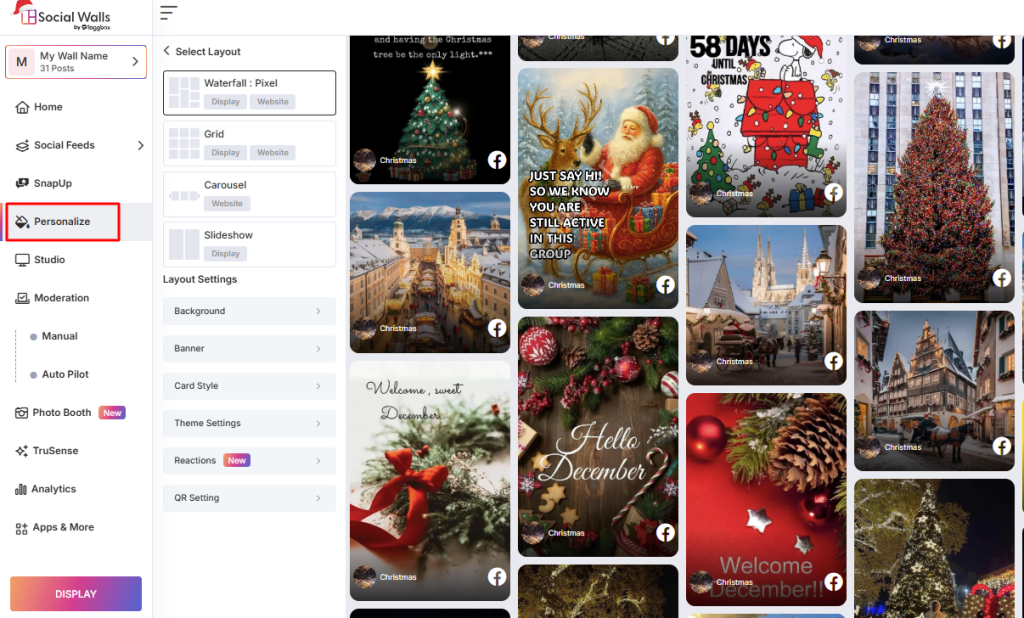
Before embedding, preview your feed and adjust layouts acc to your themes.
- layout style (grid, carousel, mosaic)
- colors and background
- spacing and padding
- headers
- moderation settings
This step makes sure your facebook widget on website blends well with your branding. Previewing helps avoid clashing colors, poor spacing, or oversized posts.
Step 6: Click Display and Copy the Embed Code

When you’re satisfied, click Display. You’ll receive an embed code—Litecode or iframe.
This code acts as the bridge between Facebook and your website. Each time you update your Facebook page, the feed automatically updates—no manual uploading or editing required.
Conclusion
Embedding a Facebook feed is more than a visual addition—it’s a trust-builder. When you embed facebook feed on website, you highlight real conversations and engagement, which instantly makes your brand feel credible.
Your pages stay updated without extra effort, and visitors are more likely to follow, like, and interact with your content. A facebook widget on website is easy to install and continues delivering value long after setup.
For brands focused on credibility, community presence, and conversions, embedding a Facebook feed is one of the simplest and smartest website enhancements you can make.