Where I Can find my Facebook Page ID

Get your Page ID in two easy steps!

Many Facebook Apps – including ours – require you to enter your Facebook Page ID (or Profile ID).
Your Page’s (or Profile’s) ID is a numeric value that uniquely identifies it inside Facebook’s database.

Step 1

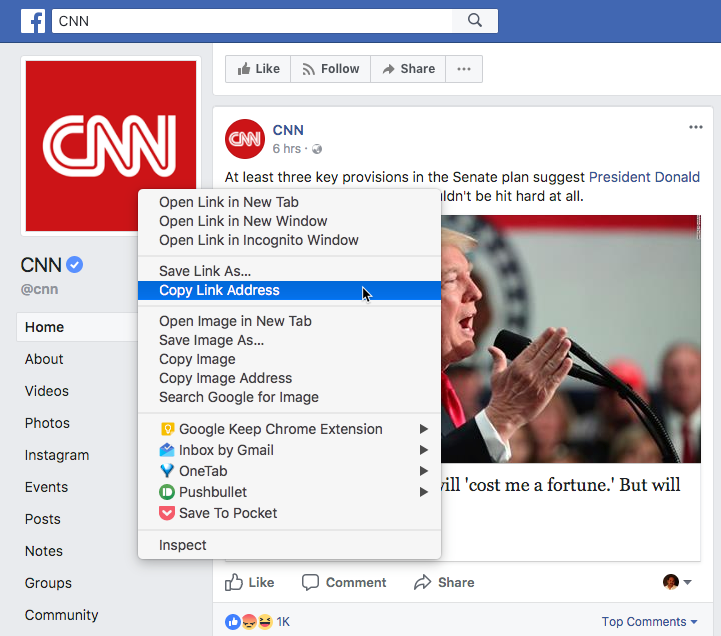
To find it, simply go to your Page (you have to be the Page’s Administrator) or your personal profile, and hover over your Profile image or Cover Photo.

As soon as your cursor’s position is over the image, a link appears on the right corner of the image that signals your ability to modify your settings.

Right-click on the image and copy the link!

facebook-page-id

Step 2

Paste the link into the Address Bar in your browser, a text editor or anywhere else that’s handy.

Your Page’s or Profile’s ID is the number after the LAST period.
The first number (fbid) is the DB id of the image, the second one (set=a.) is the album id, and that one is connected with a period to your userID”

From the address bar you can now simply copy your page ID to your clipboard.

支持团队成员 1
支持团队成员 2
支持团队成员 3

24×7 现场活动专家随时为您服务

在您的活动之前、期间和之后获得专家支持,以确保每个社交墙都能顺利运行。

开始免费试用